Configuration
Config file
All config information must be added to .gitlab-config.yml file. The file must be located
in root django project directory (same as defined in settings.BASE_DIR) and it is required
so that anything works. In the file one has to include such information as url to the GitLab site,
project id, api token, labels names/ids etc. All possible options (some are required, some optional)
with example usages you can find below.
connection
Required: true
Type: object
connection object defines some essential information that are needed to connect with appropriate
Gitlab instance and use appropriate project there. Inside connection one can include such options:
url
Required: true
Type: string
Url to the Gitlab instance. For example: "https://gitlab.com"
project_id
Required: true
Type: integer
Id of the Gitlab project you’re currently working on. It is usually displayed in the project main page.
private_token
Required: true
Type: string or object
Project access token that will be used to authenticate to GitLab. You can add one in Settings >> Access Tokens.
Select api as a scope to grant access to api.
There are 2 ways of defining it. You can either type it directly as a string or (using env keyword)
give the environment variable name that will hold the token. The second way is the recommended one.
Examples:
private_token: "project_access_token"

# Recommended
private_token:
    env: "GITLAB_PROJECT_TOKEN"
api_version
Required: false
Default: 4
Type: string
Api version used by GitLab.
timeout
Required: false
Default: 10
Type: integer
Maximal number of seconds the application will wait until GitLab response.
ssl_verify
Required: false
Default: true
Type: bool
Whether SSL certificates should be validated.
Example configuration
connection:
    url: "https://gitlab.com"
    project_id: 123
    private_token:
        env: "GITLAB_PROJECT_TOKEN"
    api_version: "4"
    timeout: 20
    ssl_verify: true
labels
Required: true
Type: object
labels object defines ids or names of labels used in your project. Keys in this object
are actually roles that play given labels. Although it is easier for the user to find a label by name,
it is recommended to use ids as changing the name doesn’t affect the config file - only deleting a
label does.
How to find a label id? The easiest way is to edit a label and find its id in the url.
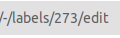
You can also obtain labels ids using GitLab api but it is a little bit more complicated. Check Gitlab api docs for reference.
Possible labels keys:
to_do
Required: true
Type: string or integer
Tasks that have to be done in nearest future.
in_progress
Required: true
Type: string or integer
Tasks that are currently being done by someone.
in_review
Required: true
Type: string or integer
Tasks that are waiting for code review. When a merge request is created, all tasks that are related to it, obtain this label automatically.
merged
Required: true
Type: string or integer
Label automatically added to tasks when a merge request related to them is merged.
Additionally, such tasks obtain {target branch name} branch to mark where things
connected with these tasks were merged. When 2 protected branches are merged in a merge
request, it also takes place so that some tasks can have multiple such labels.
On the one hand, it makes it easier to follow issues and, on the other hand, in the future it might help with handling deployments labels as the next feature of django-auto-gitlab.
backend
Required: false
Type: string or integer
Tasks that are related to the backend side. If defined, all issues with names containing
[BACKEND] (by default, it can be overriden - check issue_identifiers) get this label by creation.
frontend
Required: false
Type: string or integer
Tasks that are related to the frontend side. If defined, all issues with names containing
[FRONTEND] (by default, it can be overriden - check issue_identifiers) get this label by creation.
bug
Required: false
Type: string or integer
Tasks that are bugs. If defined, all issues with names containing
[BUG] (by default, it can be overriden - check issue_identifiers) get this label by creation.
Example configuration
labels:
    to_do: "To do"
    in_progress: "In progress"
    in_review: "CR"
    merged: 1
    backend: 2
    frontend: 3
    bug: 4
secret_token
Required: false
Type: string or object
Token that will be included in every request sent to url defined by django-auto-gitlab.

As in the case of private_token it can be just a string or the name of environment variable that will hold it.
Examples:
secret_token: "my_very_secret_token"

# Recommended
secret_token:
    env: "GITLAB_SECRET_TOKEN"
patterns
Required: false
Type: object
The object that allows the user to define some regular expressions depending on the needs. At the moment one can add 3 keys:
issues_source_branch
Required: false
Default: (\d+)
Type: string
The regular expression describing the way of capturing issues iids in a source branch name when merging it into a target branch using a merge request. By default it captures all numbers groups. It is a fallback to the description of a merge request, i.e. first the issues marked in the description (by using # + number) are checked and if there are no issues found, the source branch name is checked in order to move appropriate issues.
Note
Normal python regular expressions are expected. To be sure they will be interpreted well
one should omit " in the yaml file and the way of writing them is the same as in python
using r before string.
Example
issues_source_branch: (\d+)
merge_protected_branches
Required: false
Default: merge/(.+?)_to
Type: string
The regular expression describing the way of capturing the protected branch name if the source branch was created from the protected one. It helps detect merge of 2 protected branches if the source branch has another name and was created only for the merge request. Thanks to it, appropriate tasks will receive a suitable label. It might be helpful in the future when deployments will be handled.
Note
If 2 protected branches are directly merged, there’s no problem and issues will receive suitable labels anyway.
issue_identifiers
Required: false
Type: list
The last key of patterns object defines which labels should be automatically added
to the issue that has been created based on its name. Example identifier can be: all issues
with [BACKEND] in the name should receive backend label. If the created issue doesn’t
have neither To do nor In progress label, To do will be automatically added.
Every element in the issue_identifiers list is the object with 3 properties (all are required):
name
Type: string
The string that identifies the rule. It can be any name - it’s up to you. (There is one exception described below)
label
Type: string or integer
The label that should be added to the created issue.
pattern
Type: string or integer
The pattern that must be checked to decide if the issue should receive given label.
Warning
Default issue_identifiers look like this:
issue_identifiers:
    - name: "bug"
      label: "bug" # label you defined in labels section
      pattern: \[BUG\]
    - name: "backend"
      label: "backend" # label you defined in labels section
      pattern: \[BACKEND\]
    - name: "frontend"
      label: "frontend" # label you defined in labels section
      pattern: \[FRONTEND\]
These defaults are applied if you defined bug, backend, frontend labels
for each label apart. If you want to override pattern or label for the rule, you
need to give exactly the same name as you see above (bug, backend or frontend).
Of course, you can define as many own rules as you need.
Note
For your own rules you can add any label - it doesn’t have to be present in labels object.
Example configuration
patterns:
    issues_source_branch: (\d+)
    merge_protected_branches: merge/(.+?)_to
    issue_identifiers:
        - name: "backend"
          label: "custom_backend_label"
          pattern: \[BACKEND\]
        - name: "what you want"
          label: "something"
          pattern: "{SOMETHING}"